Saturday, 25 August 2012

iPhone factory unlocking service in chennai

Unlocking your phone will remove the SIM restriction which was programmed by your service provider to prevent you from using the phone with other networks. Once you successfully do factory unlocking, your phone will be unlocked and ready to accept not only your current SIM but any SIM card from any GSM service provider worldwide! 

              We can able to unlock following Country carrier 

  • ·       CANADA TELUS/KOODO IPHONE 4S/4G/3GS/3G –2/7 days
  • ·       USA AT&T INSTANT SERVICE (10 MIN) 3GS/4G/4S –10 minutes
  • ·       USA AT@T 4S SERVICE – 24 Hours
  • ·       USA AT&T SUPER FAST UNLOCK 3G/3GS/4G/ -   24Hours
  • ·       USA SPRINT 4G/4S 1-3 Days
  • ·       AUSTRALIA VODAFONE LOST & STOLEN –1 Day
  • ·       AUSTRALIA VODAFONE NON DETABASE –2-3 Days
  • ·       AUSTRALIA VODAFONE 3G/3GS/4G/4GS - 1 Day
  • ·       AUSTRALIA 4S OPTUS BLOCKED –4-5 Days
  • ·       AUSTRALIA 4GS OPTUS 8 == 4-5 Days
  • ·       AUSTRALIA OPTUS 3G/3GS/4G –3-5 Days
  • ·       AUSTRALIA OPTUS BLOCKED 3G/3GS/4G –4-5 Days
  • ·       AUSTRALIA 3 HUTCHION 3G/3GS/4G/4GS –2-3 Days
  • ·       AUSTRALIA 3 HUTCHION NON-DATABASE 3-5 Days
  • ·       AUSTRALIA 4S VIRGIN –4-5 Days
  • ·       AUSTRALIA VIRGIN 3G/3GS/4G –2-3 Days
  • ·       AUSTRALIA TELESTRA 3G/3GS/4G/4GS   -  5-6 Days
  • ·       KOREA KT (BLOCKED) 3G/3GS/4G/4GS –5-8 Days
  • ·       KOREA KT 2G, 3G, 4G, 4S NORMAL –3-8 Days
  • ·       3UK 3G/3GS/4G/4GS NORMAL –10-30 Days
  • ·       3UK BLOCKED 3GS/4G/4S –10-30 Days
  • ·       UK T-Mobile/ORANGE INSTANT –1 Day
  • ·       UK VODAFONE 4S/4G –1-7 Days
  • ·       UK O2 4S any/4G-8GB (Blocked Service) –10-12 Days
  • ·       UK O2 Blocked 3G/3GS/4G –10-12 Days
  • ·       3UK 3G/3GS/4G/4GS NORMAL –10-30 Days
  • ·       3UK BLOCKED 3GS/4G/4S –10-30 Days
  • ·       UK T-Mobile/ORANGE INSTANT – 1 Day
  • ·       UK VODAFONE 4S/4G –1-7 Days
  • ·       UK O2 4S any / 4G-8GB (Blocked Service) –10-12 Days
  • ·       UK O2 Blocked 3G/3GS/4G –10-12 Days
  • ·       IPHONE O2 UK NORMAL 3G/3GS/4G 4-8 Days
  • ·       GERMANY T-Mobile 3GS/4G/4S –4-6 Days
  • ·       FRANCE SFR 3GS/4G/4GS –5-7 Days
  • ·       FRANCE BOUYGES 3G/3GS/4G/4GS –1-3 Days
  • ·       FRANCE ORANGE 3G/3GS/4G/4GS –6-8 Days
  • ·       DENMARK 3 IPHONE 3GS/4G/4GS –3-4 Days
  • ·       DENMARK TDS 3G/3GS/4G –Minutes
  • ·       DENMARK TELENOR 3G/3Gs/4G –5-7 Days
  • ·       DENMARK TELIA 3G/3G/3GS/4G/4GS –5-7 Days
  • ·       SWEDEN 3 3GS/4GS   3-5 Days
  • ·       SWEDON TELENOR 3G/3GS/4G/4GS –7-8 Days
  • ·       SWEDEN TELIA 3G/3GS/4G/4GS –5-7 Days
  • ·       SPAIN ORANGE3G/3GS/4G/4GS –3-4 Days
  • ·       SPAIN MOVIESTAR BLOCKED 3GS/4G/4GS –5-7 Days
  • ·       SPAIN MOVIESTAR 3G/3GS/4G/4GS –3-5 Days
  • ·       SPAIN VODAFONE 3G/3GS/4G/4GS –   3-4 Days
  • ·       NORWAY NETCOM 3G/3GS/4G/4GS –4-7 Days
  • ·       NORWAY TELENOR 3G/3GS/4G/4GS –7-8 Days
  • ·       IRELAND O2 3G/3GS/4G/4GS –5-7 Days
  • ·       IRELAND VODAFONE 3G/3GS/4G/4GS –3-5 Days
  • ·       BRAZIL OI 3G/3GS/4G –6-7 Days
  • ·       NETHERLAND T-MOBILE 3G/3GS/4G –6-7 Days

Saturday, 28 July 2012

Apple IPSW Downloding


                                    Download official IPSW files Here

1.0.0: iPhone1,1_1.0_1A543a_Restore.ipsw
1.0.1:
iPhone1,1_1.0.1_1C25_Restore.ipsw
1.0.2:
iPhone1,1_1.0.2_1C28_Restore.ipsw
1.1.1:
iPhone1,1_1.1.1_3A109a_Restore.ipsw
1.1.2:
iPhone1,1_1.1.2_3B48b_Restore.ipsw
1.1.3:
iPhone1,1_1.1.3_4A93_Restore.ipsw
1.1.4:
iPhone1,1_1.1.4_4A102_Restore.ipsw

2.0.0 (2G):
iPhone1,1_2.0_5A347_Restore.ipsw
2.0.0 (3G):
iPhone1,2_2.0_5A347_Restore.ipsw
2.0.1 (2G):
iPhone1,1_2.0.1_5B108_Restore.ipsw
2.0.1 (3G):
iPhone1,2_2.0.1_5B108_Restore.ipsw
2.0.2 (2G):
iPhone1,1_2.0.2_5C1_Restore.ipsw
2.0.2 (3G):
iPhone1,2_2.0.2_5C1_Restore.ipsw
2.1.0 (2G):
iPhone1,1_2.1_5F136_Restore.ipsw
2.1.0 (3G):
iPhone1,2_2.1_5F136_Restore.ipsw
2.2.0 (2G):
iPhone1,1_2.2_5G77_Restore.ipsw
2.2.0 (3G):
iPhone1,2_2.2_5G77_Restore.ipsw
2.2.1 (2G):
iPhone1,1_2.2.1_5H1_Restore.ipsw
2.2.1 (3G):
iPhone1,2_2.2.1_5H11_Restore.ipsw

3.0.0 (2G):
iPhone1,1_3.0_7A341_Restore.ipsw
3.0.0 (3G): iPhone1,2_3.0_7A341_Restore.ipsw
3.0.0 (3GS):
iPhone2,1_3.0_7A341_Restore.ipsw
3.0.1 (2G):
iPhone1,1_3.0.1_7A400_Restore.ipsw
3.0.1 (3G):
iPhone1,2_3.0.1_7A400_Restore.ipsw
3.0.1 (3GS):
iPhone2,1_3.0.1_7A400_Restore.ipsw
3.1.0 (2G):
iPhone1,1_3.1_7C144_Restore.ipsw
3.1.0 (3G):
iPhone1,2_3.1_7C144_Restore.ipsw
3.1.0 (3GS):
iPhone2,1_3.1_7C144_Restore.ipsw
3.1.2 (2G):
iPhone1,1_3.1.2_7D11_Restore.ipsw
3.1.2 (3G):
iPhone1,2_3.1.2_7D11_Restore.ipsw
3.1.2 (3GS):
iPhone2,1_3.1.2_7D11_Restore.ipsw
3.1.3 (2G):
iPhone1,1_3.1.3_7E18_Restore.ipsw
3.1.3 (3G):
iPhone1,2_3.1.3_7E18_Restore.ipsw
3.1.3 (3GS):
iPhone2,1_3.1.3_7E18_Restore.ipsw

4.0.0 (3G):
iPhone1,2_4.0_8A293_Restore.ipsw
4.0.0 (3GS):
iPhone2,1_4.0_8A293_Restore.ipsw
4.0.0 (4):
iPhone3,1_4.0_8A293_Restore.ipsw
4.0.1 (3G):
iPhone1,2_4.0.1_8A306_Restore.ipsw
4.0.1 (3GS): iPhone2,1_4.0.1_8A306_Restore.ipsw
4.0.1 (4):
iPhone3,1_4.0.1_8A306_Restore.ipsw
4.0.2 (3G):
iPhone1,2_4.0.2_8A400_Restore.ipsw
4.0.2 (3GS):
iPhone2,1_4.0.2_8A400_Restore.ipsw
4.0.2 (4):
iPhone3,1_4.0.2_8A400_Restore.ipsw
4.1.0 (3G):
iPhone1,2_4.1_8B117_Restore.ipsw
4.1.0 (3GS):
iPhone2,1_4.1_8B117_Restore.ipsw
4.1.0 (4):
iPhone3,1_4.1_8B117_Restore.ipsw
4.2.1 (3G):
iPhone1,2_4.2.1_8C148_Restore.ipsw
4.2.1 (3GS):
iPhone2,1_4.2.1_8C148a_Restore.ipsw
4.2.1 (4):
iPhone3,1_4.2.1_8C148_Restore.ipsw
4.2.6 (4 CDMA):
iPhone3,3_4.2.10_8E600_Restore.ipsw
4.3.0 (3GS):
iPhone2,1_4.3_8F190_Restore.ipsw
4.3.0 (4 GSM):
iPhone3,1_4.3_8F190_Restore.ipsw
4.3.1 (3GS):
iPhone2,1_4.3.1_8G4_Restore.ipsw
4.3.1 (4 GSM):
iPhone3,1_4.3.1_8G4_Restore.ipsw
4.3.2 (3GS):
iPhone2,1_4.3.2_8H7_Restore.ipsw
4.3.2 (4 GSM):
iPhone3,1_4.3.2_8H7_Restore.ipsw
4.2.7 (4 CDMA):
iPhone3,3_4.2.7_8E303_Restore.ipsw
4.2.8 (4 CDMA):
iPhone3,3_4.2.8_8E401_Restore.ipsw
4.3.3 (3GS):
iPhone2,1_4.3.3_8J2_Restore.ipsw
4.3.3 (4 GSM):
iPhone3,1_4.3.3_8J2_Restore.ipsw
4.2.9 (4 CDMA):
iPhone3,3_4.2.9_8E501_Restore.ipsw
4.3.4 (3GS):
iPhone2,1_4.3.4_8K2_Restore.ipsw
4.3.4 (4 GSM):
iPhone3,1_4.3.4_8K2_Restore.ipsw
4.2.10 (4 CDMA):
iPhone3,3_4.2.10_8E600_Restore.ipsw
4.3.5 (3GS):
iPhone2,1_4.3.5_8L1_Restore.ipsw
4.3.5 (4 GSM):
iPhone3,1_4.3.5_8L1_Restore.ipsw

5.0 (3GS):
iPhone2,1_5.0_9A334_Restore.ipsw
5.0 (4 GSM):
iPhone3,1_5.0_9A334_Restore.ipsw
5.0 (4 CDMA):
iPhone3,3_5.0_9A334_Restore.ipsw
5.0 (4S):
iPhone4,1_5.0_9A334_Restore.ipsw
5.0.1 (3GS):
iPhone2,1_5.0.1_9A405_Restore.ipsw
5.0.1 (4 GSM):
iPhone3,1_5.0.1_9A405_Restore.ipsw
5.0.1 (4 CDMA):
iPhone3,3_5.0.1_9A405_Restore.ipsw
5.0.1 (4S):
iPhone4,1_5.0.1_9A405_Restore.ipsw
5.0.1 (4S) [9A406]:
iPhone4,1_5.0.1_9A406_Restore.ipsw
5.1.0 (3GS):
iPhone2,1_5.1_9B176_Restore.ipsw
5.1.0 (4 GSM):
iPhone3,1_5.1_9B176_Restore.ipsw
5.1.0 (4 CDMA):
iPhone3,3_5.1_9B176_Restore.ipsw
5.1.0 (4S):
iPhone4,1_5.1_9B179_Restore.ipsw
5.1.1 (3GS):
iPhone2,1_5.1.1_9B206_Restore.ipsw
5.1.1 (4 GSM):
iPhone3,1_5.1.1_9B206_Restore.ipsw
5.1.1 (4 GSM Build 9B208):
iPhone3,1_5.1.1_9B208_Restore.ipsw  ok
5.1.1 (4 CDMA):
iPhone3,3_5.1.1_9B206_Restore.ipsw
5.1.1 (4S):
iPhone4,1_5.1.1_9B206_Restore.ipsw = ok

Sunday, 3 June 2012

Enabling Text to Speech in iphone


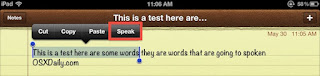
The newer versions of iOS include a fantastic text to speech engine that lets you select any text and have it spoken to you. This basically means you can have an iPhone, iPad, or iPod touch read you the content of any web page, notes, text files, or even eBooks and iBooks. Before you can use the text to speech function though, you have to enable it.

Enabling Text to Speech in iOS

  1. Launch “Settings” and tap on “General”
  2. Scroll down to “Accessibility” and tap on “Speak Selection”
  3. Slide to “ON” and adjust the “Speaking Rate” slider to an appropriate setting


Now that that speech feature has been enabled, it’s time to use it.

Using Text to Speech in iOS

  1. Tap and hold on any text until the selector tool comes up
  2. For a single word, tap “Speak”, otherwise to speak everything tap on “Select All” followed by “Speak”


Once speech has started the “Speak” button turns to “Pause”, making it easy to halt and resume any spoken text. You’ll notice the voice is that of Siri’s, which is also the voice of Samantha in Mac OS X which you can add yourself if you haven’t done so yet.
With speech enabled, speaking text is available in just about any app as long as you can select the text. This works perfectly in Safari, Notes, Instapaper, Pocket, and even iBooks if you want stories read to you, though you’ll have to select all the text again on each page when it’s finished reading the current page. Preferably a future version of iBooks will just include the speech engine natively and we won’t have to do that. Anyway, enjoy!


Sunday, 20 May 2012

iPhone iOS 5.1.1 Battery Life Problems Solution

iOS updates can come with some unexpected surprises regarding battery life and iOS 5.1.1 isn’t much different. While there are a fair amount of reports of positive battery improvements not all of us were so lucky, the battery life on my iPad 3 absolutely tanked after updating to iOS 5.1.1.
After rebooting several times and trying a handful of troubleshooting solutions, I discovered this to be a fairly common issue with users who updated iOS through on-device OTA updates, though there doesn’t seem to be much explanation as to the cause. Fortunately the fix is simple, so if you have experienced a drop in device longevity after the 5.1.1 update try the solution below.
Before proceeding you should perform a quick manual back up through iCloud or iTunes just in case something goes wrong. This process resets all iOS device settings, meaning you will have to re-enter Wi-Fi passwords, auto-fill info, Apple ID, etc.
  1. Open “Settings” and tap on “General” then “Reset”, tap on “Reset All Settings”
  2. Enter the passcode if you have one set, then tap “Reset” to confirm the settings adjustment
  3. Reboot the device and set it up as new, reentering personalization data as necessary
Battery life should be immediately improved, though a comment left on Apple Discussion Boards suggests letting the iPhone/iPad/iPod touch drain down to 0% and then recharging for an hour or so past 100% before disconnecting from a power source is a good follow-up.
This worked wonders for my 3rd gen iPad and battery life is now back to the 10+ hours I had before the update. If you’re still having problems you can try some of our past tips on improving and maximizing battery life for iDevices.

Thursday, 2 February 2012

Cell Phone LCD Screen Repair Service

 Cell Phone LCD Screen Repair Service


We fix most cell phone lcd screen problems including:
Cracked cell phone screen repair
Blank cellular phone lcd screen repairs
Bleeding cell phone lcd screen repair
Smashed cell phone screen repairs
Black ink spots on the lcd screen
Lines running through the middle of your cell phone display screen

Don't worry, We can fix your broken cell phone lcd screen

The descriptions below may seem like they all simply need the LCD Display Screen replaced, but the problem could be caused by other things. We recommend come to our shop with that cellular phone and find the exact cause of the problem. Once that has been determined you will be contacted before we proceed with the repair of your cell phone.

Cell Phone Charger Port Repair Service


Cell Phone Charger Port Repair Service


We fix most cell phone charger port problems including:

Broken cell phone charging port
Cell phone power source not working
loose cell phone charger port
Cell phone will not charge
Bent cell phone charging contacts
broken pins in usb port
Cell phone usb connector not charging
Cell phone power connector doesn't work


Don't worry; we can fix your cell phone usb charger port connector
 
The above descriptions below may seem like they all simply need the charger port replaced, and most probably will but some of the problems could be related to a defective battery or charger. It may even be related to minor moisture which will find its way into the cell phone over time. We recommend that you purchase this cell phone Repair Service and come with that can diagnose your cell phone and find the exact cause of the problem. Once that has been determined you will be contacted before we proceed with the repair of your cell phone. Parts are not included with this service.